
Sontana
Sontana is a text editor for the Thai language, designed to make it easy to edit Thai text on non-Thai systems.
If you are not using a Thai version of your OS or a Thai keyboard it is difficult to enter and edit text: You cannot see what you are typing, there are implicit rules to what order characters may be typed and files can often be coded using different standards.
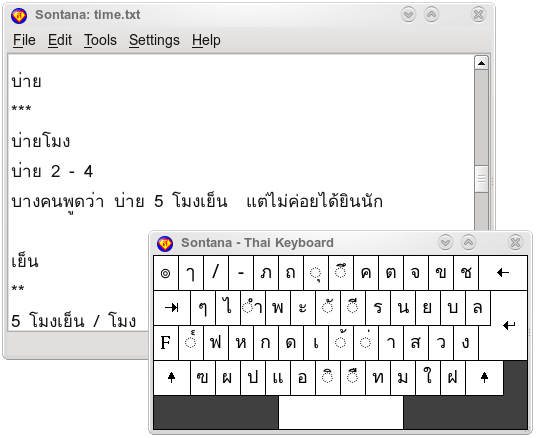
Sontana can solve these problems: it has a virtual keyboard which allows you to click on the letters, files loaded or text pasted can be automatically decoded, Sontana can check for invalid sequences of letters in files or while typing and repair them.
Features
| Text Editor | Virtual Keyboard |
|---|---|
|
Standard editing functions, including search. Load local font file without being an administrator user. Adjustable level of save reminders. Built in switchable key map. |
On screen virtual keyboard. Adjustable size and font. Click to type without a Thai keyboard. Enter characters not available on a real keyboard. |
| Text Coding | Sequence Checking |
|---|---|
|
Automatically select correct coding for loaded files. Decode copy and paste from other source. Encode text copied to clipboard. |
Enforce Thai letter order on input (typed and virtual). Check text for correct letter order. Automatically repair broken text sequence. Conforms to WTT Standard. |
Download
| File | Platform | Version | MD5 |
|---|---|---|---|
| Sontana-1_9.dmg | macOS | 1.9 | 855befb883001b0811bbe5f1b1cab625 |
| Sontana-1_9.zip | Windows | 1.9 | f541ffe1248aa5558f3487b178e80a00 |
| Sontana-1.9-x86_64.AppImage | Linux | 1.9 | 243ea4274aaff65f0c801564c782a3ec |
On Mac, open the dmg file and drag the Sontana icon to your Applications directory.
On Windows, double click the zip file and copy the Sontana directory to wherever you want to keep it. No installation is required. For convenience, you may want to create a shortcut to Sontana.exe and move the shortcut to your desktop.
On Linux, download the file, rename it to Sontana, make it executable using chmod a+x Sontana and run.
Notes
You will need some Thai fonts, some system fonts such as Tahoma are OK, I recommend installing the Thai Linux Working Group Scalable Fonts - download the precompiled fonts. If you do not have admin status on the computer you want to use then Sontana has a feature that lets you load a font from a local directory.
Sontana cannot edit very large files, this is a limitation of Qt. Text files tend to be quite small but if you encounter problems edit the file in sections.
Acknowledgements
Many thanks to the people who helped translate the user interface:
- Japanese by Tomoyuki Mukasa.
- Thai by Chalida Piyathamrongchai and Lyndon Hill.
There have been a few updates since the translations were checked by native speakers, any mistakes are my own. Other languages are available on request if you are willing to translate.
If you find any bugs, errors or other problems then please let me know so I can fix them. If you use Sontana and have no problems please send me an email, even if you just say "I use Sontana". Thanks.